

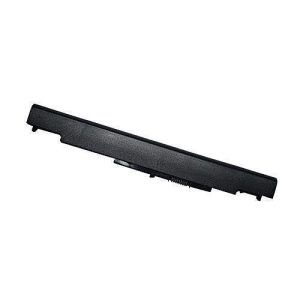
Hp 840 G2 Series Laptop Battery (CM03, CMO3, CM03XL)
Key FeaturesCOLOR:BLACKCELL ARRANGEMENT: 4 CELLSBATTERY TYPE: Li-ionPRODUCT TYPE: original battery Expected operation time: 3 -4 hoursCondition: 100% New from ManufacturerWhen you receive the battery, if it has no charge in it, please charge it up to 100% then drain it to 10% then charge it up back to 100% to fully activate the cellClick the link below to check our store for more batteries (original or replacement)https://www.jumia.com.ng/datasys/ You can also click on the link below to confirm what you want to order:Let’s chat on WhatsApp! It’s a fast, simple, and secure app we can use to message and call each other for free. https://whatsapp.com/channel/0029VbAovV28KMqm6tnWeE2Z
Description
Product detailsThe laptop battery is compatible with:EliteBook 740 G1 / 740 G2 / 745 G1 / 745 G2 / 750 G1 / 750 G2 / 755 G1 / 755 G2 / 840 G1 / 840 G2 / 845 G1 / 845 G2 / 850 G1 / 850 G2 / 855 G1 / 855 G2 ZBook 14 G2 ZBook 15u ZBook 14, E7U24AA Mobile Workstation
Compatible Part Numbers:
CM03 CM03XL CO06 CO06XL CM03024XL-PL How to Purchase the Correct Battery…
Method 1: Press Windows + R on your laptop. Type “msinfo32” and click OK. In the pop-up window, locate the “System Model” to find your specific laptop model.Method 2: Remove the battery from your computer. Check the model of your battery. Refer to the compatible list to ensure the model you are searching for matches the battery you need. If the model is listed as compatible, that’s the right battery for your laptop.
Note: When purchasing the battery, make sure it is compatible with your laptop model to ensure proper functionality.High quality materials and battery cells to ensure true capacity and more recharge cycles. Expected operation time: 3 -4 hours. This may vary, depending on device type and the way it is used. Low power consumption IC design. Overcharging and Discharging Circuit Protection.



Related products

Aico 5m patch cable


Aico 42u network rack 600×800

Aico 6u network rack 600×450

Reviews
There are no reviews yet.